All work

Case Study 01

Cutting Cloud Provisioning Cycle Time by 33% for CVS Health's Data Architects

Unified Provisioning to GCP — case study cover mockup showing the redesigned provisioning form
Role
Lead Product Designer · Lead UX Researcher
Team
VP of Architecture, Governance Director, Product Head, Technical Writing Lead
Timeline
8 months across two phases — Aug 2023–Feb 2024 & Jun 2025–Aug 2025
Tools
Figma & Figma AI, Miro & Miro AI, Tableau, Confluence, Jira, Copilot
Business model
Enterprise SaaS, Healthcare

Context

Two connected projects, sixteen months apart.

This case study spans two phases at CVS Health: a foundational research initiative that defined who the platform's users actually were, and a targeted design sprint that applied that foundation to redesign the workflow its most capable users relied on daily.

The Problem

The Platform's Most Capable Users Had the Worst Workflow

Fragmented Workflows and Repetitive Data Entry

Divisional architects managing 18–20 concurrent projects had no unified starting point for provisioning. Every request meant translating business requirements into technical specifications across multiple disconnected tools — re-entering the same data, guessing at undocumented prerequisites, and navigating in-house terminology with no definitions in sight.

No Transparency, Constant Re-Justification

Without visibility into request status, architects defaulted to re-justifying the same decisions in bi-weekly VP calls — a bottleneck for everyone involved. Compliance gaps went undetected until reviews, governance coverage was inconsistent, and trust in the platform eroded steadily. What looked like a workflow problem was also a trust problem.

Research & Insights

From Enterprise-Wide Archetypes to One Underserved User Group

Two phases of research — an 8-stakeholder, 180-response, 10-interview foundational study and four iterative rounds of architecture interviews — surfaced four findings that shaped the design direction:

01

Technical Data Owners Had the Highest Literacy and the Least Support

The Enterprise Data Archetypes research identified Technical Data Owners as the platform's most technically capable users — yet their primary workflow (provisioning) had received the least design investment. 88% of all users engaged only with the marketplace; architects were left managing critical infrastructure through ad hoc workarounds with no structured support.

"I know exactly what I need to build. Getting the system to let me do it is a different problem entirely."

02

In-House Jargon Was a Hidden Barrier

Across four rounds of interviews, architects consistently flagged in-house terminology and unclear prerequisites as the first source of confusion — before the workflow had even formally begun. Language that was invisible to the platform team created real friction for the people submitting requests every day.

"I filled this out the same way I always do and it came back rejected. I still don't know what they actually want from me."

03

Lack of Transparency Turned Every Project Into a Fire Drill

Without visibility into where a provisioning request stood, architects defaulted to re-justifying the same decisions repeatedly in bi-weekly calls. Process opacity didn't just slow things down — it eroded confidence in the platform's reliability as a foundation for infrastructure work.

"I submitted it two weeks ago. I have no idea if anyone's looked at it, or what's blocking it."

04

Architects Needed a Single Source of Truth Across Dozens of Projects

Divisional architects managed 18–20 active provisioning projects at any given time. Critical context — approvals, statuses, documentation — lived across disconnected tools with no unified view, no reliable audit trail, and no way to surface bottlenecks before they became delays.

"I have twenty open projects and I'm tracking them in a spreadsheet because nothing talks to anything else."

Process

Eight Months of Research, Two Months to Ship

The provisioning redesign built directly on the Enterprise Data Archetypes initiative — six months of foundational research that produced a shared user framework before any design work began.

Phase 1 — Enterprise Data Archetypes (Aug 2023–Feb 2024)

Eight stakeholder interviews, a 180-response survey, and 10 user interviews across four iterations produced five Enterprise Data Archetypes: Business Data Consumer, Business Data Owner, Technical Data Consumer, Technical Data Owner, and Data Producer. The Technical Data Owner — characterized by high data literacy, responsibility for managing infrastructure, and consistent friction around workflow fragmentation — became the anchor archetype for what would eventually become the provisioning redesign.

Phase 2 — Provisioning Design Sprint (Jun 2025–Aug 2025)

With the archetype framework in place, I partnered with the VP of Architecture, Governance Director, Product Head, and Technical Writing Lead to scope the redesign — anchoring scope decisions to the Technical Data Owner's documented pain points rather than open feature requests. A co-led service blueprint workshop mapped frontstage, backstage, and support flows end to end, surfacing where automation could absorb the most friction: the manual handoffs that stretched every cycle, and the VP calls that had become the de facto approval mechanism.

Four iterative rounds of testing with divisional architects validated the direction at each stage — and corrected it where needed. Early designs that prioritized information density were scaled back after architects flagged cognitive load in the first round. AI tools were used not just to generate copy, but to surface documentation that already existed in the system and had never been made accessible in context.

Before

Fragmented flows, no visibility, constant re-justification across 3+ disconnected tools.

01

Request Initiation

02

Data Entry & Prerequisites

03

Waiting & Status Checks

04

Review & Approval

05

Implementation

User
Actions
Pain point
Identifies need through word of mouth or past experience
No official entry point — asks colleagues where to start
Searches multiple wikis and channels for the right form
Pain point
Re-enters the same data across 3+ disconnected tools
Unclear which prerequisites apply; guesses on required fields
In-house jargon with no definitions causes confusion from the start
Pain point
No visibility into where the request stands
Follows up manually via Slack or email
Tracks 18–20 open projects in personal spreadsheets
Pain point
Re-justifies the same decision in bi-weekly VP calls
Receives vague rejection with no clear guidance on what to fix
Rework cycles add days to each request
Pain point
Eventually receives a one-off email confirmation
No implementation status visibility after submission
No audit record unless someone builds it manually
Front­stage
Multiple wikis and tool links with inconsistent documentation
No single starting page or guided intake flow
Disconnected forms with overlapping and contradictory fields
Prerequisite steps undocumented or buried in Confluence
No status dashboard or tracking view
No proactive notifications — silence until something breaks
Bi-weekly VP call is the de facto approval mechanism
Rejection communicated via email with unclear feedback
Single confirmation email with no follow-up
No audit documentation surfaced to the architect
Line of Visibility
Back­stage
Platform team unaware of incoming request — no intake queue
Request origin depends on who the architect happens to reach first
Manual data transcription by support staff across tools
Validation done inconsistently — depends on reviewer experience
Request sits in a shared inbox; routed manually by whoever is available
No visibility into queue depth or bottleneck location
Manual governance review with no consistent routing logic
Approval bottlenecks at VP level — no escalation path
No audit trail created unless manually built post-hoc
Manual handoff between architecture and infrastructure teams
Execution inconsistent — depends on individual team norms
Support
Systems
Confluence, Slack, email threads
Spreadsheets, shadow IT workarounds, separate form tools
Shared inboxes, informal Slack pings
Calendar meetings, ad-hoc email, no audit system
GCP console accessed manually, no automated configuration

After

A single guided flow, governance embedded by design. Automated pipelines replace manual handoffs.

01

Unified Entry

02

Guided Form

03

Automated Tracking

04

Embedded Governance

05

Automated Implementation

User
Actions
Accesses a single, clearly signposted provisioning entry point
Prerequisites surfaced upfront; FAQ resolves questions before submission begins
Completes one guided flow: App Info → Project & Environment → Tools & Permissions → Network → Overview
No repeated data entry; inline help resolves jargon in context
Receives instant submission confirmation
Monitors all projects in a single live dashboard
Proactive notifications sent at every stage change — no chasing required
Reviews transparent approval status without joining a call
If revision needed, receives structured, itemized feedback directly
Receives automated implementation confirmation with full details
All steps and outcomes visible in dashboard; audit docs auto-generated
Front­stage
Unified provisioning portal with embedded Q&A hub
Documentation Center pages surfaced in-context; no external search needed
Six-step form with progress indicator and overview confirmation screen
AI-assisted copy clarifies in-house terminology inline at every field
Live status dashboard with ETA visible across all active projects
Proactive email and in-app notification at each stage transition
Approval status clearly displayed; structured revision requests if needed
Audit-ready documentation visible to the architect throughout
Real-time implementation status in dashboard
Auto-generated audit documentation surfaced immediately on completion
Line of Visibility
Back­stage
Automated intake queue triggered on submission
Prerequisite validation runs automatically before routing begins
Auto-validation at each step; data passed directly to approval pipeline
Pre-populated fields from existing Active Directory and GCP records
Automated pipeline routes request via lineage-based SME routing
Bottlenecks surfaced in real time to platform team for intervention
Governance rules embedded in pipeline — compliance checked automatically
Audit trail auto-generated at every step; no manual documentation needed
Automated infrastructure provisioning triggered on final approval
Structured ops handoff with full context; no manual translation required
Support
Systems
Unified provisioning portal, Documentation Center, GCP API
Active Directory, GCP APIs, automated form validation engine
Workflow automation engine, notification service, SME routing system
Governance rule engine, audit trail system, compliance database
GCP automation, monitoring integration, automated audit trail

Solution

One Guided Flow, Governance Embedded by Design

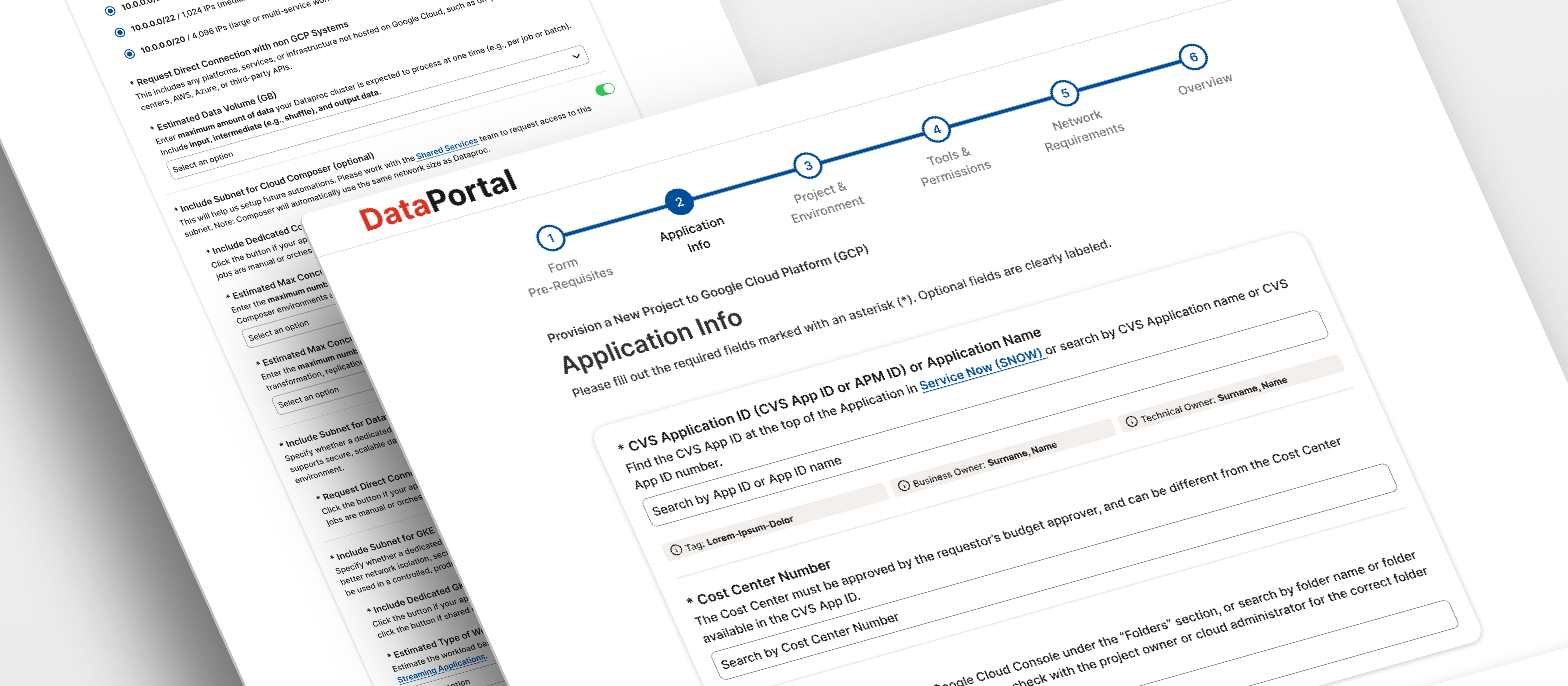
The redesign replaced a fragmented patchwork of disconnected tools with a single, six-step provisioning flow — built around the documented needs of the Technical Data Owner archetype and designed to make compliance the path of least resistance.

01

Unified Six-Step Form Replacing Disconnected Flows

Before

Multiple disconnected flows with undocumented steps and no clear starting point. Architects re-entered the same data across tools with no visibility into whether prerequisites had been met before submitting.

After

A single guided flow: Form Prerequisites → Application Info → Project & Environment → Tools & Permissions → Network Requirements → Overview. Each step surfaces the right information at the right time, eliminating duplicative data entry and reducing unnecessary re-work.

02

Embedded Q&A Hub Over External Calls

Before

Architects relied on bi-weekly VP calls to resolve questions about prerequisites, terminology, and approval status — creating bottlenecks and wasted time on both sides of each request.

After

An embedded Q&A hub surfaces relevant Documentation Center pages directly in context — at the step where confusion was most likely to occur, not on a separate documentation page an architect might never find. Proactive notifications replaced reactive check-ins. AI-assisted copy addressed terminology at the point of confusion, before it could delay submissions.

03

Automated Pipelines and Real-Time Governance Visibility

Before

Manual handoffs added days to every cycle. Governance gaps were discovered retroactively — inconsistent audit trails made compliance reviews unreliable and stretched SLA breach rates to 18%.

After

Automated pipelines cut approval time by two days. Lineage-based routing directed each request to the right subject matter expert automatically — replacing the manual queue that had been bottlenecking approvals at the VP level. A live dashboard gave architects real-time status across all concurrent projects; structured audit trails brought governance coverage from 45% to 80% and reduced SLA breach rate from 18% to 14%.

Impact

Faster, More Governed, and Measurably More Trusted

The redesigned provisioning flow launched in August 2025. Across the two-month engagement, it delivered:

33%

Reduction in total provisioning cycle time (15 → 10 business days)

+7 pts

User satisfaction score increase (68% → 75%)

+35 pts

Governance audit coverage increase (45% → 80%)

The work also reduced SLA breach rate from 18% to 14% and form abandonment from 22% to 19%. The provisioning flow established a repeatable design pattern — a unified intake flow with embedded governance — that the team is now applying to adjacent onboarding and application flows across the enterprise.

"What Isa delivered wasn't just a redesigned form — it was a workflow our architects could finally trust. The cycle time gains were measurable almost immediately, but what I hadn't anticipated was how much the embedded guidance changed behavior. The bi-weekly calls where architects came in confused and frustrated? Those stopped. That's the kind of outcome that compounds."
VP of Data Architecture, CVS Health

Reflection

Navigating Complexity, Earning Clarity

01

The Team's Language Was Invisible to the People Who Needed It Most

Early testing made something clear: the jargon problem wasn't a documentation failure — it was a perspective failure. The platform team had stopped noticing terminology that confused architects every day. The instinct might have been to add a glossary; the better answer was to surface definitions at the point of confusion, inside the form itself, at the exact moment each term appeared.

What I decided
  • Rather than comprehensive documentation, I designed for contextual clarity — inline definitions triggered at the fields where terminology was most likely to cause a submission error or abandonment.
  • AI generated plain-language draft definitions; divisional architects validated them across four rounds. The distinction matters: AI surfaced candidates, but architect feedback determined what was actually accurate and helpful.
02

The Harder Work Was Defining Who We Were Designing For

The provisioning redesign succeeded in part because the harder work of defining the user had already been done. But that work took four full iterations to get right — and not because the research was weak. The first three iterations produced archetypes with names like Data Craftsman and Insight Alchemist. Stakeholders found them resonant in workshops and useless in design reviews.

What I decided
  • After the third iteration, I replaced creative metaphor-based names with direct, role-based labels that mapped to how people already described their own work. A name that can't survive a design review isn't doing its job.
  • The Technical Data Owner became a useful design tool because it was literal — you could say it in a stakeholder meeting and everyone knew exactly who you meant. That specificity made the provisioning sprint faster to scope and easier to defend.

Key learnings

Foundational Research Compounds

The sixteen months between the archetypes initiative and the provisioning sprint weren't a gap — they were the investment paying off. A validated, shared user framework made every design decision faster and easier to defend with stakeholders who had already agreed on who we were designing for.

Embedded Guidance Beats External Documentation

Surfacing help in context — inside the form, at the exact moment of confusion — was more effective than any documentation page could be on its own. This wasn't a content strategy insight; it was a placement insight. The same information, in the right place at the right time, changed behavior in a way that a glossary or help center never would have.

What's your next big challenge?

I'd love to help tackle it. Reach out by email or connect with me on LinkedIn.

Next project

EDP Documentation Center